In today's demanding workplaces, Rugged Laptops have become essential tools. These devices are designed to withstand harsh environments. According to a report by VDC Research, the rugged laptop market has grown by 6% annually, driven by increasing adoption across industries such as military, construction, and field service.
Selecting the right rugged laptop means considering specific needs. These devices come in various types, such as fully rugged, semi-rugged, and ultra-rugged. Each type has strengths tailored to different environments. For instance, in construction sites, a rugged laptop must resist dust and moisture. In contrast, a military-grade rugged laptop must endure extreme temperatures and shock impacts.
However, not every rugged laptop is perfect for every job. Some users may find the battery life lacking in some models. Others might face difficulties with heavier units in mobility. Thus, it’s crucial to assess individual requirements carefully. Choosing wisely ensures long-term reliability and productivity in challenging conditions.
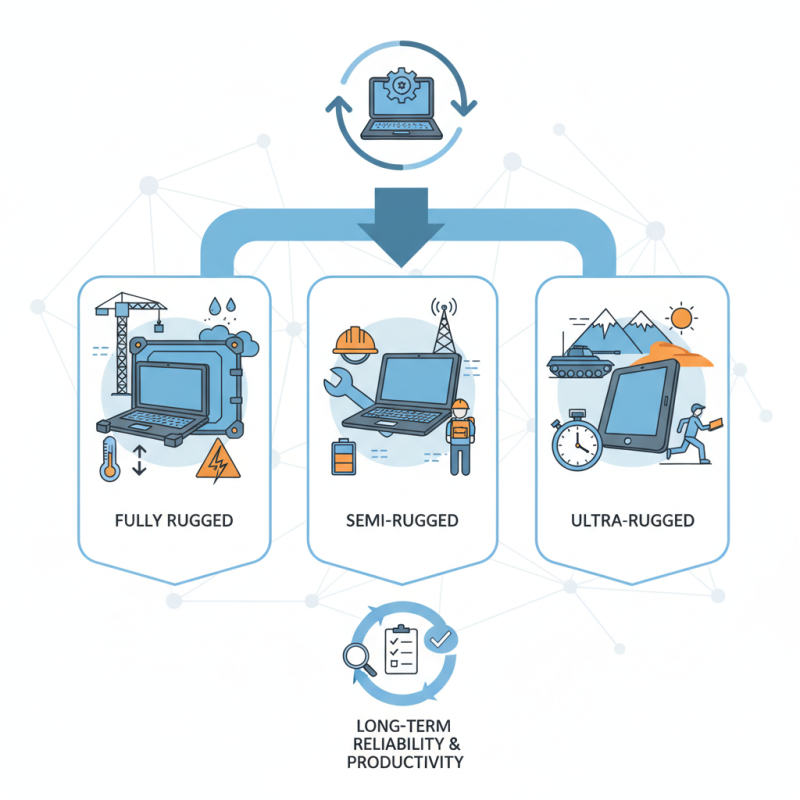
When choosing a rugged laptop, understanding the specifications and standards is crucial. Rugged laptops must withstand extreme conditions. Look for devices certified to MIL-STD. It ensures durability against drops, vibrations, and extreme temperatures. Additionally, consider the Ingress Protection (IP) rating. This measures resistance to dust and moisture. A laptop with at least an IP65 rating can handle rain and splashes.
Tip: Examine the keyboard and touchpad design. A spill-resistant keyboard can save your device from accidents. If your work involves outdoor usage, ensure that the screen is anti-glare. This will improve visibility in bright conditions.
Battery life is another key factor. Many rugged laptops offer extended battery options. This is vital for long days in the field. However, some users find that heavy-duty batteries add weight. Balancing power needs and portability can be challenging.
Tip: Test the laptop's weight and feel. It should be comfortable for prolonged use. Evaluate the ports available. Different tasks require specific connectivity options. Always choose a model that aligns with your needs to avoid future frustrations.
When choosing a rugged laptop, evaluating performance metrics is crucial for making an informed decision. Key factors include processing power, battery life, and durability. Rugged laptops often feature powerful processors to handle demanding tasks. Look for specifications that highlight the processing speed and cores. This ensures smooth multitasking in challenging environments.
Battery life matters significantly, especially for fieldwork. A laptop with a long-lasting battery allows for uninterrupted use in remote locations. Aim for models that offer at least 10 hours of battery life. Consider how quickly the device charges, too. Fast charging options are beneficial when time is limited.
Tips: Check for MIL-STD certifications, indicating military-grade durability. This ensures the laptop can withstand drops, dust, and moisture. Also, prioritize screen readability. Bright, anti-glare displays are essential for outdoor work. Keep in mind that while rugged laptops are built to last, weight and design can vary. A heavier model may sacrifice portability, impacting field efficiency.
When selecting a rugged laptop, understanding durability ratings is critical. Two primary standards are MIL-STD-810 and IP ratings. MIL-STD-810 measures the ability to withstand extreme conditions. This includes temperature, humidity, shocks, and vibrations. For example, laptops that pass these tests often endure harsher environments typical in military or industrial settings. According to a recent report, about 30% of rugged devices undergo MIL-STD-810G testing.
On the other hand, IP ratings focus on water and dust resistance. A laptop with an IP67 rating can withstand immersion in water up to one meter. This is vital for users in construction or fieldwork scenarios. The protection levels are clearly defined, allowing users to make informed choices. However, not all laptops meet both standards. A device may be MIL-STD compliant but lack adequate IP protection. This discrepancy can lead to user disappointment in real-world applications.
Choosing the right rugged laptop requires careful consideration of these ratings. It’s essential to evaluate how and where you will use the device. Look for specifications that align with your specific needs. Sometimes, specifications can mislead. A laptop may have robust ratings but still fail under certain conditions. Therefore, understanding these durability standards is key to ensuring long-term reliability.
When selecting a rugged laptop for specific work environments, understanding your needs is crucial. A construction site may require a device that withstands shock and dust. According to a recent industry report, nearly 30% of professionals in construction highlight durability as a top priority. Waterproof features are also essential in environments prone to spills or weather exposure.
Battery life plays a vital role too. Many rugged laptops offer extended battery options, supporting over 12 hours of use. For field technicians, reliance on a laptop throughout the day is common. A report indicated that 65% of such workers ranked battery longevity as a key factor in their decision.
Weight can be another challenge. Workers often transport their laptops between sites. A lighter model can significantly improve portability without sacrificing performance. However, lighter options may compromise some rugged features. Striking a balance between weight and toughness is essential. Each decision comes with trade-offs that need careful consideration.
When budgeting for rugged laptops, it’s essential to compare costs between rugged and standard models. Undoubtedly, rugged laptops often carry a higher price tag due to their durability and specialized features. They are designed to withstand drops, spills, and extreme conditions. These robust features make them attractive for certain professionals. Yet, potential buyers must evaluate whether they truly need such resilience.
Standard laptops generally cater to everyday tasks and come at a lower price point. However, they may not last in demanding environments. For example, a standard model might fail after a few accidental drops or exposure to dust. While it’s tempting to save money on these models, the long-term costs of repairs or replacements can add up swiftly. Some users might discover that investing in a rugged laptop could lead to overall savings.
Think about your work environment. If your job involves construction, outdoor activities, or travel, the extra cost might be justified. On the other hand, individuals working in office settings might not need the added protection. It’s critical to reflect on your own needs and habits. Balancing cost with durability requires careful thought and consideration. Are you truly maximizing your investment?
„Thanks to the LUVIR technology, the solder resist process could be switched directly from the previously used mask exposure to direct exposure. As an outstanding digital solution on the market, this technology has been able to demonstrate fast process times and superior quality on our certified conventional ink in production. This allowed us to fully digitize the solder mask process at low cost – without process or ink adjustments. An excellent benefit to our production in Rot am See.“
Ralf Göhringer (Head of Production WE Rot am See)
I would definitely recommend the Limata machine and team for a future company purchase
Michael Greenaway
Compunetics Inc.
“The Limata ldi has been amazing!! Best thing we did was buy this machine”
Richard Brady
GM
Circuitlabs
“Since 2019, we have been running the Limata X1000 LDI system (including LUVIR for solder mask imaging) in daily production as an addition to our current process with film. The machine was capable of properly exposing Taiyo PSR-4000 BN (DI) solder mask types on normal to high-copper boards using a new and unique direct imaging process. The machine operating interface is very user friendly which allowed for a quick technical training curve. The pre-registration processing reduced several seconds of production time at every print. Limata support and service staff is incomparable. They supported our team every step of the way at basically any time of the day or night, with literally, an immediate response time, customizing the software interface to best fit our Operations and needs.
We have exposed more than 8,000 prints since end of October, on various solder mask colors and some resist film panels. Limata, has proven to be very capable and innovative. They are a strong contender in the industry.
We have very much enjoyed this project, and working with the team!
Thank you Limata for the continued support and being a part of our growth.”
Bill Sezate
Vice President, GM
Summit Interconnect
As a replacement to our current contact exposure process with film, the LIMATA X2000 system including LUVIR-Technology was capable of properly exposing non-LDI solder mask types using a direct imaging process. The machine offers cutting edge software with a very intuitive operating interface which allowed for quick technician training curve. The dual drawer system combined with pre-registration processing reduced several seconds of production time at every machine cycle. Limata support and service staff is world class. They added software patches to keep production running at shortest possible response times, customized the software interface to best fit our in-house Operations system, and even wrote a step-by-step machine processing manual. As a result of the project, we have exposed more than 16,000 times on various product types and solder mask brands/colors. Limata, in a very short timeframe as a company, has definitely shown they are truly innovative and will be challenging the industry of direct imaging for the top spot.
Kevin Beattie
Process Engineer
TTM Technologies
Forest Grove Division