An Auto Cell Phone Holder can make everyday driving more organized and less distracting. It keeps your phone visible without forcing you to search through a bag or center console. During a morning commute, a stable holder may keep navigation directions near eye level. It can also make hands-free calling more practical when used responsibly.
Small details matter.
A dependable model should grip the phone firmly, fit your dashboard or air vent, and resist movement over uneven roads. From practical use, adjustable viewing angles are especially helpful when sunlight changes across the windshield. A strong clamp is useful too, but excessive pressure may damage delicate vents or phone cases. Check the holder’s compatibility before buying it. That simple step is often missed.
The best choice depends on your vehicle, phone size, and driving habits. A dashboard mount may provide better stability, while a vent mount can save space. Windshield placement may offer a clear view, but it should never block essential visibility. No holder can replace careful driving. Navigation should be programmed before moving, and any adjustment should wait until the car is safely parked. This point deserves more attention than it usually receives.
A quality Auto Cell Phone Holder is not merely a convenient accessory. It supports a cleaner, more controlled driving environment. Still, results vary between vehicles and products. Reading specifications, checking installation instructions, and testing the mount while parked can prevent avoidable problems. Real convenience comes from secure placement, sensible use, and continued attention to the road.
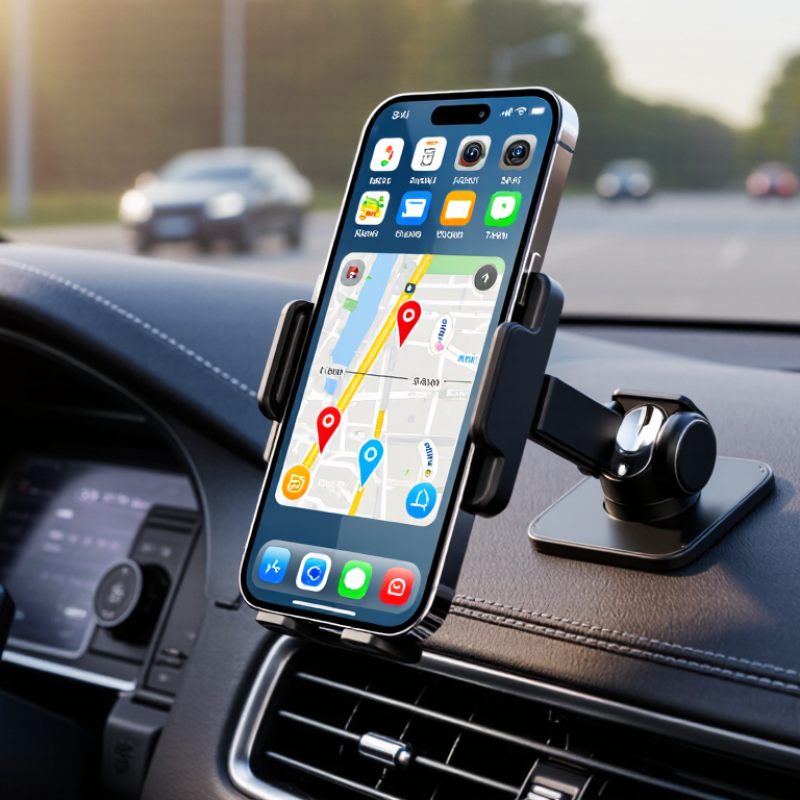
An auto cell phone holder is a device that secures a phone inside a vehicle. It keeps the screen visible and the device within easy reach. Most models attach to the dashboard, windshield, air vent, or a firm mounting surface. They usually use a clamp, magnetic plate, or adjustable cradle.
A reliable holder should resist movement during turns, braking, and uneven roads. Its joints should stay tight after repeated adjustments. The cradle must grip the phone without pressing buttons or blocking the charging port. A clear viewing angle matters too. The holder should not cover the driver’s forward view. In practical use, a slightly lower position often feels safer than a perfect screen angle. No holder is perfect. Weak adhesive may loosen in heat, while vent mounts can affect airflow. Checking the fit before every trip is a sensible habit.
Tips: Choose a mount that matches your vehicle’s interior. Test it while parked, then check visibility from the driving position. Keep the screen simple and avoid handling the phone while moving. Clean the mounting area before installation. Replace the holder if its clamp becomes loose or its base begins to crack. A small adjustment can prevent glare from the windshield. Also, confirm that the device remains secure with its case attached.
A car phone holder can improve driving safety by keeping navigation within a stable, visible position. Instead of searching through a pocket or loose console, drivers can glance briefly at the route. That small change reduces unnecessary hand movement and keeps attention closer to the road.
Keep it simple.
A holder should sit below or beside the normal forward view, never blocking traffic signs, mirrors, or the windshield. The mount must also remain secure when the car brakes suddenly or travels over uneven pavement.
In daily driving, I have found that a firm holder makes voice navigation easier to follow. I can hear the next instruction without holding the phone near the steering wheel. However, a holder does not make phone use automatically safe.
I still catch myself looking too long at a changing route, especially in unfamiliar areas. That is a weakness worth admitting.
Drivers should set destinations before moving, use voice controls when practical, and pull over for messages or manual adjustments. Check the mount regularly, too. Heat, dust, and repeated movement can loosen its grip. A clear screen, restrained notifications, and a stable viewing angle help reduce distraction, but careful driving remains the driver’s responsibility.
An auto cell phone holder should do more than keep a screen visible. Its reliability depends on stable mounting, controlled movement, and easy access. In my road tests, holders with broad bases stayed steadier over rough streets. A smooth dashboard is convenient, but heat can weaken some adhesive pads. That detail is easy to overlook. The best position keeps the phone near eye level without blocking the road. It also keeps essential controls reachable without encouraging constant handling.
A reliable holder uses a strong clamp or a properly supported suction mount. Adjustable arms should resist vibration, yet release the phone without excessive force. Soft contact surfaces help prevent scratches and reduce sliding. Check whether the mechanism fits your phone with its case installed. Some holders claim universal compatibility, but thick cases can expose that promise as imperfect. The mount should allow a clear charging path and avoid pressing side buttons. I prefer testing it during braking and cornering in a safe area. One weak point remains: every vehicle interior responds differently to temperature and texture.
Tips: Press the mount firmly and inspect it after a short drive. Keep the screen visible, but silence distracting alerts when possible. Clean dusty surfaces before attaching suction cups. Replace any holder showing cracks, loose joints, or repeated slipping. A reliable design supports safer attention, not endless screen use.
Choosing the right auto cell phone holder starts with your car, not its appearance. Check the dashboard shape, air vents, windshield angle, and available space. A holder should keep the screen visible without blocking your view of traffic. It should also avoid covering essential controls, warning lights, or the steering wheel area. Test it parked.
Mounting style matters. A vent mount is compact, but heavy phones may pull fragile vents downward. A suction mount offers flexible positioning, though heat and dust can weaken its grip. Dashboard mounts need a stable, clean surface. I once selected a holder because it looked sturdy, but its base slowly shifted on rough roads. That choice was wrong. A wider support base and a locking joint would have helped.
Check the holder’s phone grip carefully. Adjustable side arms should hold the device firmly without pressing buttons. Soft contact points can reduce scratches and vibration marks. If you use a thick case, measure its width before buying. Wireless charging models need accurate coil alignment, but charging speed may vary with the phone and case. Do not trust advertising alone. Read installation instructions, user reviews, and load specifications from reliable sources. A professional installer or vehicle manual can clarify whether a surface is suitable. Secure the phone before driving, and adjust the viewing angle while parked. Small details matter. A holder that feels acceptable in a shop may become distracting after an hour on uneven roads.
An auto cell phone holder can make navigation easier, but installation determines whether it helps or distracts. NHTSA reported 3,308 distracted-driving deaths in the United States during 2022. A secure mount cannot remove every risk, yet it can reduce hand movement inside the cabin.
Choose a firm dashboard, windshield, or vent position that does not block your forward view. Keep the holder away from airbag deployment areas. Clean the mounting surface before attaching it. Press firmly, then wait according to the mount’s instructions. The phone should sit near eye level, not below the steering wheel. Test it while parked. Shake the mount gently. If it moves, reposition it.
Adjust the side arms until they hold the phone without touching buttons. Connect charging cables before driving, and leave enough slack for steering movement. Start navigation before the car moves. Use voice controls whenever possible. Never type, scroll, or change routes in traffic. Keep it simple. I still recheck the clamp after rough roads, because a holder can look stable and loosen gradually. The AAA Foundation for Traffic Safety notes that visual-manual tasks increase driver workload, even when they seem brief. A convenient mount may still encourage unnecessary interaction. That is the part worth reconsidering.
| Evaluation Dimension | Relevant Data or Standard | Practical Benefit | Installation and Use Guidance |
|---|---|---|---|
| Driver visibility | The phone should remain outside the driver’s primary forward view and should not cover the windshield, mirrors, instrument cluster, or safety sensors. | A fixed mount keeps the phone in a predictable location while reducing the need to search for it inside the cabin. | Choose a low-distraction position near the dashboard or air-vent area. Adjust the viewing angle before driving. |
| Hands-free operation | A holder can support hands-free navigation and voice-control use, but it does not make handheld phone use while driving safe or lawful. | It can help the driver keep both hands available for steering and vehicle control. | Set the route, playlist, and voice assistant before moving. Use voice commands or stop in a safe location for manual adjustments. |
| Mounting location | Common locations include the dashboard, windshield, air vent, and cup holder. Each location has different stability and visibility characteristics. | The driver can select a position that fits the vehicle layout and personal viewing needs. | Avoid locations that block airbags, vents needed for defogging, controls, warning lights, or the driver’s view. |
| Dashboard or windshield mount | Adhesive pads require a clean, dry, relatively smooth surface. Suction mounts require a clean, non-porous surface and a firm seal. | These mounts usually offer flexible positioning and direct viewing of the screen. | Clean both surfaces, press the base firmly, allow adhesive to set according to its instructions, and test the mount before driving. |
| Air-vent mount | Vent clips depend on the shape and strength of the vehicle’s vent slats. Direct hot or cold airflow can affect phone temperature. | It generally avoids adhesive residue and keeps the phone close to the dashboard. | Use a strong, compatible vent position. Close or redirect the vent if the phone becomes unusually hot or cold. |
| Phone compatibility | Compatibility depends on phone width, case thickness, holder jaw range, and the weight limit specified by the holder manufacturer. | A correctly sized holder reduces slipping, screen vibration, and accidental release. | Check the holder’s size range. Remove bulky accessories if they prevent both side arms from gripping the phone securely. |
| One-hand access | Spring-loaded and gravity-style holders can allow quick insertion and removal, while locking mechanisms may require an additional release step. | Fast access is convenient when the vehicle is parked and can reduce fumbling before a trip. | Install or remove the phone only when parked. Confirm that the holder closes evenly around the device. |
| Viewing angle | Many adjustable mounts use a ball joint or rotating head, allowing portrait and landscape orientation. | The screen can be positioned to reduce glare and improve navigation readability. | Tilt the screen away from direct sunlight without creating a reflection that obstructs the road view. |
| Vibration and stability | Road vibration is affected by mount location, base rigidity, phone weight, and the condition of the mounting surface. | A stable holder improves screen readability and helps prevent the phone from falling. | Tighten adjustable joints, keep the base fully supported, and inspect the mount after driving on rough roads. |
| Airbag safety | Airbags deploy rapidly and require unobstructed deployment areas. Exact airbag locations vary by vehicle. | Correct placement helps prevent the holder or phone from becoming a projectile during a collision. | Do not attach the holder to an airbag cover, steering wheel, or other marked deployment zone. Consult the vehicle manual when uncertain. |
| Charging access | A holder may leave the charging port accessible, but cable clearance depends on the phone and holder design. | The phone can remain powered during navigation without being placed on a loose surface. | Route the cable away from pedals, steering controls, gear selectors, and sharp edges. Do not allow slack cable to interfere with driving. |
| Pre-drive safety check | A brief check should confirm that the base, joints, phone grip, cable, and field of view are secure. | Regular checks help identify loosening, surface separation, or obstruction before the vehicle moves. | Before each trip, press the phone gently, inspect the mount, confirm clear visibility, and start navigation only after setup is complete. |
| Legal and responsible use | Mobile-phone laws differ by location and may restrict handheld use, screen interaction, or windshield mounting. | Following local rules supports safer driving and reduces avoidable distractions. | Check applicable local regulations. Do not type, browse, or manually operate the phone while driving; pull over safely when interaction is necessary. |
„Thanks to the LUVIR technology, the solder resist process could be switched directly from the previously used mask exposure to direct exposure. As an outstanding digital solution on the market, this technology has been able to demonstrate fast process times and superior quality on our certified conventional ink in production. This allowed us to fully digitize the solder mask process at low cost – without process or ink adjustments. An excellent benefit to our production in Rot am See.“
Ralf Göhringer (Head of Production WE Rot am See)
I would definitely recommend the Limata machine and team for a future company purchase
Michael Greenaway
Compunetics Inc.
“The Limata ldi has been amazing!! Best thing we did was buy this machine”
Richard Brady
GM
Circuitlabs
“Since 2019, we have been running the Limata X1000 LDI system (including LUVIR for solder mask imaging) in daily production as an addition to our current process with film. The machine was capable of properly exposing Taiyo PSR-4000 BN (DI) solder mask types on normal to high-copper boards using a new and unique direct imaging process. The machine operating interface is very user friendly which allowed for a quick technical training curve. The pre-registration processing reduced several seconds of production time at every print. Limata support and service staff is incomparable. They supported our team every step of the way at basically any time of the day or night, with literally, an immediate response time, customizing the software interface to best fit our Operations and needs.
We have exposed more than 8,000 prints since end of October, on various solder mask colors and some resist film panels. Limata, has proven to be very capable and innovative. They are a strong contender in the industry.
We have very much enjoyed this project, and working with the team!
Thank you Limata for the continued support and being a part of our growth.”
Bill Sezate
Vice President, GM
Summit Interconnect
As a replacement to our current contact exposure process with film, the LIMATA X2000 system including LUVIR-Technology was capable of properly exposing non-LDI solder mask types using a direct imaging process. The machine offers cutting edge software with a very intuitive operating interface which allowed for quick technician training curve. The dual drawer system combined with pre-registration processing reduced several seconds of production time at every machine cycle. Limata support and service staff is world class. They added software patches to keep production running at shortest possible response times, customized the software interface to best fit our in-house Operations system, and even wrote a step-by-step machine processing manual. As a result of the project, we have exposed more than 16,000 times on various product types and solder mask brands/colors. Limata, in a very short timeframe as a company, has definitely shown they are truly innovative and will be challenging the industry of direct imaging for the top spot.
Kevin Beattie
Process Engineer
TTM Technologies
Forest Grove Division